Nick Academy
- 2.8
- Rating
- 100.00K
- Installs
- Free
- Price

 Analysis by App-foxy
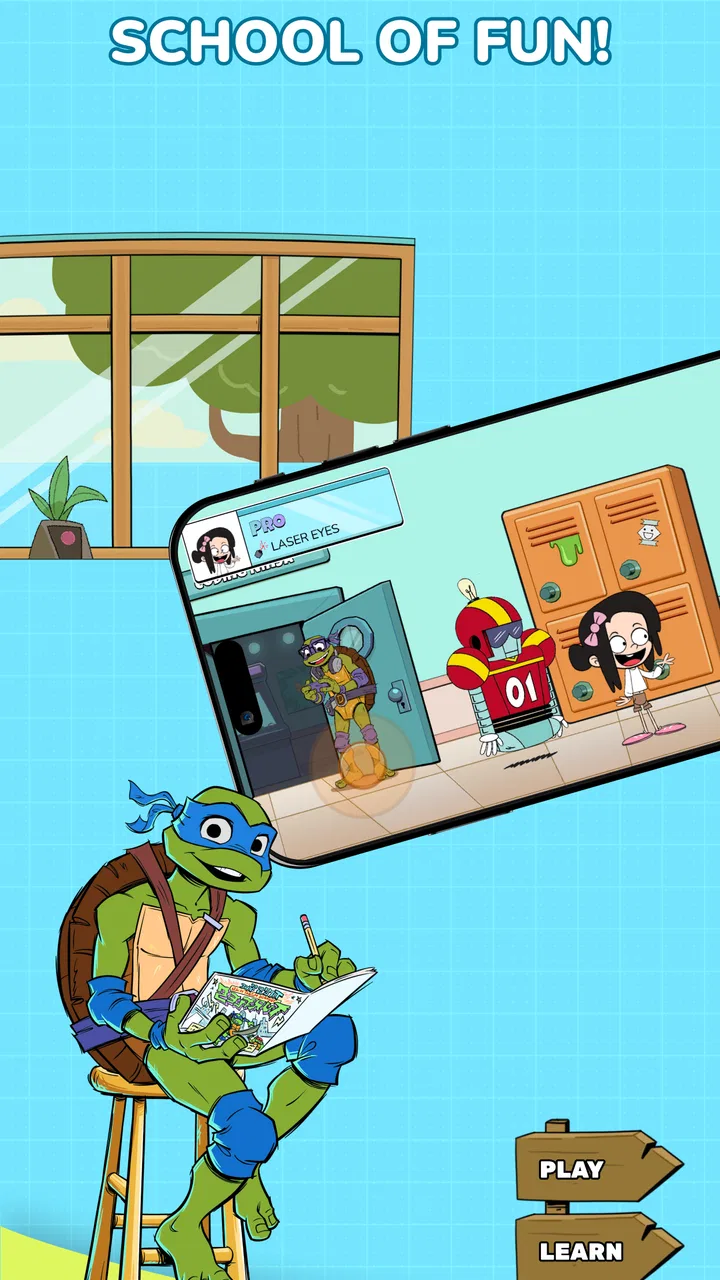
I approached Nick Academy as a short, approachable learning game rather than as a replacement for a full coding course. Its appeal is easy to understand: it brings coding, science, math, and space into game-like activities, with Nickelodeon characters providing the familiar hook. That combination makes the app feel aimed at children and families who want learning to seem less like homework.
My overall impression is mixed but useful. The concept is inviting, the subjects are broad, and the free entry makes it easy to try. At the same time, the modest average rating of 2.8 from roughly 250 ratings suggests that the experience has not worked equally well for everyone. I would treat it as a casual learning companion, not as a polished, complete educational curriculum.
How Nick Academy feels in everyday use
The game comes from Nick Academy and sits in the educational category. It is free to install, carries an Everyone age rating, and has passed 100,000 installs. Those details point to a product designed for broad family access rather than a specialist tool for advanced students.
You May Also Like

 Blood Strike: 2.5 Anniversary
Blood Strike’s Loadouts Turn Every Drop Into a Tactical Gamble
A close look at Blood Strike’s custom loadouts: how fast access to signature weapons reshapes its battle royale rhythm, rewards preparation, and narrows the gap between fights.

 Pandora - Music & Podcasts
Pandora’s Music Is Easy to Start, but Harder to Recover
Pandora’s strength is its low-effort path from a seed to a station. Its weak spot is how much confidence it asks you to place in connection, setup, and quiet recovery.

 8 Ball Pool
8 Ball Pool Is Built on Rivalries, Rematches, and Routine
A close look at the rivalries, rematches, shared routines, and unanswered safety questions that turn a quick pool match into a persistent mobile community.

 Samsung Music
Samsung Music’s Quiet Strength Is Playing What You Already Own
Its reach comes less from spectacle than from dependable access to a personal library. That simplicity is both the app’s strongest retention engine and its ceiling.

 AccuWeather: Weather Radar
AccuWeather Review: A Quick, Clear Forecast for Everyday Decisions
For everyday plans, the best forecast is the one you can understand quickly. AccuWeather makes rain timing, radar, and local conditions easy to act on, with a few trade-offs.

 Hill Climb Racing
Why Hill Climb Racing Still Turns Crashes Into One More Run
A tiny car, a bumpy hill and one more upgrade: Hill Climb Racing keeps resurfacing because its simple chaos makes every near-miss feel personal.
More From Our News Desk
View All News


The strongest use case is a child who already enjoys Nickelodeon characters and needs a gentle reason to spend a few minutes with academic topics. A parent could offer it during a quiet afternoon, before a trip, or after school when a traditional worksheet is likely to be rejected. The character-led presentation lowers the barrier to starting, especially for children who respond better to play than to formal lessons.
I would not expect the same result from every age group. Younger learners may enjoy the recognizable presentation and simple sense of discovery, while older children who already understand basic programming or mathematics may find the activities too light. For them, a structured course with explanations, exercises, and visible progression would probably be a better main resource.
Speed expectations on a compatible device
The app requires at least Android 10, so compatibility matters before anything else. On a device that meets that requirement, I would expect the opening experience to be reasonably manageable for ordinary play, but I would not judge educational value by launch speed alone. A game can open quickly and still feel slow if its lessons are interrupted by loading, unclear instructions, or repeated attempts to understand what the activity wants.
Because the experience combines several subjects and character-based presentation, the perceived speed will depend on how quickly a child can move from one activity to the next. Adults may notice pauses more than children do, particularly when supervising several short sessions in a row. For a child, a brief wait can feel longer if it comes between an exciting activity and the next challenge.
My practical advice is to install it before handing over the device. That gives you a chance to see how it behaves on your particular phone or tablet, adjust expectations, and decide whether the text and controls are comfortable for the child using it. This is more useful than assuming that a recent operating-system requirement automatically means a smooth experience on every compatible device.
The current version is 1.18.17, which is important when comparing your experience with older comments. An app can change over time, so reports from earlier releases may not describe the version currently available. I would still keep the average rating in mind as a warning to test it personally rather than relying only on its colorful premise.
What happens during heavier sessions
The most demanding moments are likely to be the ones where a child moves repeatedly between different learning areas, restarts activities, or spends a long stretch playing instead of completing one brief exercise. That kind of use is more revealing than a single quick launch. It shows whether the app remains comfortable when it becomes part of a routine rather than a one-time experiment.
For family use, I would divide play into small sessions. A child might explore a math activity one day, return to a science topic later, and then try a space-related challenge when interest changes. This approach has two advantages: it reduces fatigue, and it makes it easier to notice whether the app is genuinely teaching something or merely keeping attention through familiar characters.
A useful habit is to ask the child to explain one idea after playing. If the activity involved a coding concept, ask what changed when the child made a different choice. If it involved science or space, ask what was learned rather than whether the game was fun. This turns the app from passive screen time into a short conversation and helps reveal where the content is strong or shallow.
Longer sessions may also expose the limits of using one game for several subjects. A broad selection sounds attractive, but breadth can come at the expense of depth. I would use the app to spark questions, then follow up with a book, a teacher-approved lesson, or a hands-on activity when the child wants to go further.
Reliability and recovering from interruptions
For a child-focused app, recovery matters almost as much as initial stability. Children may leave the app suddenly, switch to another activity, lock the screen, or hand the device to someone else. A smooth return to the learning activity is valuable because a confusing restart can erase motivation very quickly.
I would test this deliberately during the first session. Start an activity, leave the game, return after a short pause, and see whether the child can understand where to continue. Repeat the test after rotating the device or switching between activities if those actions are part of your normal routine. This is a simple way to judge whether the app fits your household without making assumptions about behavior on every device.
If an activity stops responding, the sensible first step is to close and reopen the game rather than repeatedly tapping the screen. Children often interpret an unresponsive moment as their own mistake, so an adult can help by explaining that restarting is a normal troubleshooting step. Keeping the operating system current and leaving reasonable free storage can also reduce general device friction, although neither guarantees a perfect result.
The rating of 2.8 is the clearest reason I would keep expectations measured. It does not tell me exactly which issue affected each player, but it does tell me that the experience deserves a trial run before it becomes a regular part of a child’s routine. I would not dismiss the app solely because of that number, yet I would also avoid presenting it as consistently dependable for every family.
Device limits, age fit, and household choices
The minimum operating-system requirement is Android 10. That makes the app unsuitable for devices that cannot run that version, even if the hardware still works well for simpler educational software. Families using an older hand-me-down phone should check compatibility first, because a child-friendly idea is not helpful if the device cannot install it.
Screen size can influence the experience too. A tablet may be more comfortable for shared play or for children who need larger visual targets, while a small phone is more convenient for travel. I would choose the device based on how the child will use it: a short supervised activity can work on a phone, but a longer learning session is usually easier to manage on a larger display.
The Everyone rating makes the game broadly suitable from an age-classification perspective, but parents should still judge whether the learning level matches their child. An age label does not guarantee that every topic will be equally engaging or equally challenging. A child who is just beginning may need help reading instructions, while a more advanced learner may need additional explanation beyond what the game provides.
There is also a financial detail worth considering. The game is free to start, but in-app purchases range from $7.99 to $59.99 per item. I would review the purchase settings before letting a child play independently. The free entry is a real advantage for testing, but the presence of paid items means families should decide in advance whether the app belongs in a no-purchase environment or whether an adult will approve anything beyond the initial experience.
This is one area where Nick Academy differs from a workbook or a teacher-created activity: the game format is more inviting, but it can introduce the extra decision of how to handle optional spending. A completely predictable offline resource may be preferable for parents who want a fixed-cost learning routine with no purchase concerns.
Where it stands beside ordinary learning alternatives
Compared with a conventional coding lesson, Nick Academy is likely to feel less intimidating and more immediately playful. The Nickelodeon connection can persuade a reluctant child to begin, which is a meaningful strength. However, a dedicated coding platform will usually be the better choice for learners who want a clear sequence, deeper practice, or a path toward building real projects.
Compared with math and science worksheets, the game has a stronger chance of holding attention, particularly during a short break. Worksheets are often easier for an adult to preview, print, and revisit without a device, though they may lack the instant engagement that makes a child willing to start. I see Nick Academy as a supplement that can introduce a topic or refresh interest, not as a universal replacement.
Compared with educational videos, the game should offer a more active role because the child is expected to interact rather than only watch. That can make a concept more memorable, but only if the activity asks the child to think instead of simply tapping through familiar scenes. Parents can improve the value by pausing afterward and connecting the game’s idea to something visible in daily life.
Compared with a broad learning subscription, the free installation is easier to sample, while the paid items require more careful household judgment. A subscription service may provide more consistent depth across subjects, but it can also feel less personal to a child who is drawn to Nickelodeon characters. The right choice depends on whether motivation or curriculum structure is the immediate priority.
Three practical ways to get more from it
First, use it as a diagnostic rather than assuming that enjoyment equals mastery. Watch which subjects the child chooses without prompting, then ask for an explanation in their own words. This can reveal whether the app is helping with genuine understanding or simply providing an entertaining theme.
Second, create a short “play, explain, apply” routine. Let the child complete one activity, describe what happened, and then connect it to a small offline example. A coding idea might lead to arranging instructions for making a sandwich; a space topic might lead to looking up the Moon in a book; a math activity might lead to measuring ingredients. The game becomes the starting point, not the entire lesson.
Third, test recovery before unsupervised use. Interrupt a session, return to it, and check whether the child can continue without adult intervention. If the process is confusing, keep the app supervised and use shorter visits. This is a more valuable test than simply checking whether it installs successfully.
A fourth tip is to separate character appeal from content quality. If a child asks to play because of the familiar characters, use that enthusiasm to introduce one specific learning goal. Do not feel obliged to extend the session just because the theme is attractive. Ending after a successful, understood activity is better than allowing attention to fade into aimless tapping.
Who should try it, and who should skip it
I would recommend trying it for families looking for a free introduction to educational games, especially when a child enjoys Nickelodeon characters and needs encouragement to explore coding, science, math, or space. It may also suit parents who want a flexible activity for short periods rather than a formal daily course.
I would be more cautious if your child needs advanced instruction, detailed progress tracking, or a carefully sequenced curriculum. Students preparing for a specific academic goal will probably benefit more from a focused learning platform or direct guidance from a teacher. The same applies to families that prefer entirely offline materials or do not want to manage in-app purchases.
Children who become frustrated by unclear directions may also need an adult nearby at first. The broad subject mix is appealing, but it can make the experience feel less focused than a single-purpose app. If your child wants to master one skill deeply, the variety may be a distraction rather than a benefit.
My performance verdict
Nick Academy is best understood as a character-driven educational game with a low barrier to entry, not as a complete learning system. Its speed and stability should be judged on the specific Android device being used, particularly because the app requires Android 10 or later and the public rating is only 2.8. I would install it, test a few activities, interrupt a session, and check the purchase settings before recommending it for regular independent play.
The free starting point makes that experiment worthwhile, and the Everyone rating keeps the intended audience broad. Still, the paid items, mixed rating, and likely difference between casual play and deeper study mean that expectations should remain realistic. My recommendation is to use it as a short, supervised spark for learning, then build on the best moments with real conversation and other resources.
For the right child, the Nickelodeon connection may be exactly what turns “I do not want to study” into “Can I try one more activity?” That is a valuable opening. I would simply make sure the game supports the learning goal rather than becoming the goal itself.
FAQs for Nick Academy
01What is Nick Academy, and what can children do with the app?
Nick Academy is an educational app designed to make learning more entertaining for children through interactive activities, games, challenges, and age-appropriate content. Depending on the available version and region, children may practice subjects such as reading, mathematics, science, or general knowledge while exploring a colorful interface inspired by Nickelodeon characters and themes. Parents should review the current content selection before downloading.
02Is Nick Academy suitable for my child’s age and learning level?
The app is generally aimed at children, but the ideal age range can vary according to the activities included in the version available in your country. Some exercises may be better suited to younger learners, while others can feel too simple or advanced. Before installing it, parents should check the store listing, recommended age rating, supported languages, and educational topics to confirm that the app matches their child’s needs.
03Does Nick Academy require an internet connection to work?
Nick Academy may require an internet connection for downloading the application, loading certain lessons, updating content, synchronizing progress, or displaying optional online features. Some activities could remain available after they have been loaded, but offline access should not be assumed for the entire app. If your child will use it while traveling or without Wi-Fi, test the relevant lessons first and check the developer’s latest requirements.
04Is Nick Academy free to download, and are there purchases or advertisements?
The download model for Nick Academy can differ by platform, location, and current publisher policy. Some versions may be free, while others can include subscriptions, premium lessons, in-app purchases, or advertising. Parents should read the Google Play or App Store listing carefully before installation and review the purchase settings on the device. Using parental controls is recommended, especially if children use the app independently.
05Is Nick Academy safe for children and does it collect personal information?
Nick Academy is intended for a young audience, but parents should still examine its privacy policy, permissions, and account requirements before allowing regular use. Check whether the app requests a name, email address, profile information, usage data, or access to device features. It is also wise to disable unnecessary permissions, supervise the first sessions, and confirm how progress data is stored, shared, and deleted.
Pros
- Clear lessons make complex topics easier to understand.
- Short activities fit well into busy study schedules.
- Progress tracking helps users monitor their learning.
- Works well for learners who prefer guided instruction.
- Useful supplementary material supports independent practice.
Cons
- Some advanced content may require a paid subscription.
- The learning pace can feel slow for experienced users.
- Limited offline access may be inconvenient during travel.
- Certain exercises may become repetitive over time.
- Performance can depend heavily on a stable internet connection.

Nick Academy
Gallery